How to Turn on Auto High Beam Toyota: Step-by-Step Guide

Turning on auto high beam headlights in your Toyota is a simple action that can make driving at night much easier and safer. If you have ever struggled to remember when to switch between high and low beams, you will appreciate this feature.
Auto high beam technology uses sensors to detect cars ahead and automatically switches your headlights between high and low beam for you. However, many Toyota owners don’t realize their car has this feature, or they are unsure how to activate it correctly.
If you are new to Toyota’s auto high beam system, this guide will walk you through every step in clear, easy-to-understand language.
What Is Auto High Beam In Toyota Vehicles?
Auto high beam is an advanced headlight system found in many new Toyota models. When driving at night, it automatically turns your high beams on when the road is dark and no other cars are around. If another vehicle is detected, the system switches to low beam to avoid blinding other drivers.
This makes night driving less stressful and helps you see farther down the road.
Most Toyota vehicles from 2016 onward offer auto high beam as part of the Toyota Safety Sense package. Common models with this feature include the Camry, Corolla, RAV4, Highlander, Prius, and many others. If you are unsure whether your Toyota has auto high beam, check your owner’s manual or look for a camera mounted near the rearview mirror on your windshield.
How Auto High Beam Works
The auto high beam system uses a forward-facing camera usually located near the top of the windshield. This camera detects the headlights of oncoming vehicles or the taillights of cars in front of you. If it senses another vehicle, it switches your lights to low beam. Once the road is clear, it returns to high beam.
Auto high beam works only at night and when you are driving above a certain speed (usually about 21–25 mph or 35–40 km/h). It also requires your headlights to be set to automatic or on. The system will not operate in bright city conditions, heavy fog, or if the windshield is dirty.
Why Use Auto High Beam?
Using auto high beam can improve safety for both you and other drivers. Here are some of the main benefits:
- Better visibility: High beams help you see hazards, pedestrians, and animals sooner.
- Less distraction: You don’t have to remember when to switch beams.
- Safer for others: The system avoids shining bright lights in other drivers’ eyes.
Many drivers are surprised at how much less tired they feel on long night drives with this feature.
How To Turn On Auto High Beam Toyota: Step-by-step
Turning on auto high beam in your Toyota is simple, but you need to follow the correct steps. The process may vary slightly depending on your Toyota model and year, but the basics are the same.
1. Start Your Vehicle
Make sure your Toyota is turned on. Auto high beam will not activate if the car is off, in accessory mode, or if the parking brake is engaged.
2. Set Your Headlights To ‘auto’ Or ‘on’
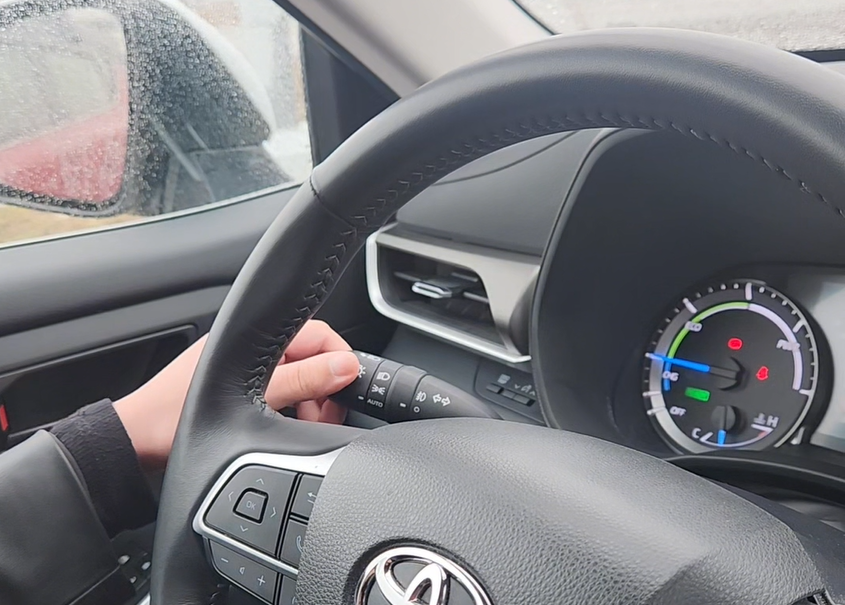
The most common mistake beginners make is forgetting to put their headlights in the right mode. Find the headlight stalk on the left side of your steering wheel. Rotate the end of the stalk so the headlight setting is either at AUTO or the normal ON position (not parking lights).
- If your car has a dedicated AUTO setting, use it for the best experience.
- If there’s no AUTO, use the ON position.
3. Push The Headlight Lever Forward
With the headlights on, push the entire headlight lever away from you (toward the dashboard). You should feel a click. This is the same as turning on manual high beams, but in Toyota models with auto high beam, this action activates the system.
4. Look For The Auto High Beam Indicator
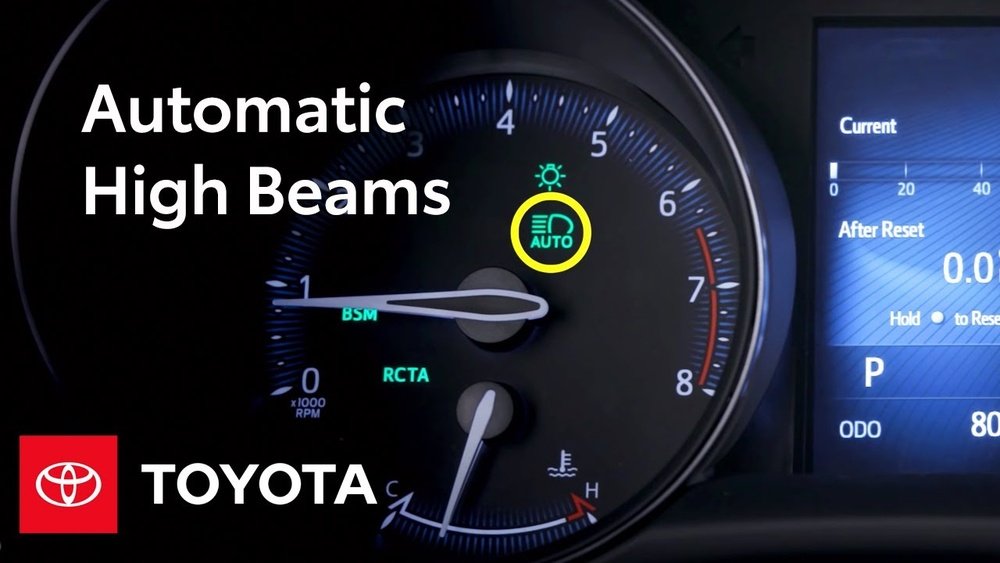
Check your dashboard for a green auto high beam icon. It looks like a headlight with the letter “A” next to it. If you see this, the system is ready. If the icon is not lit, auto high beam is not active.
5. Drive Above Minimum Speed
Begin driving. The system usually needs you to go over 21–25 mph (35–40 km/h) before it starts working. If you drive slowly, it may not activate.
6. Let The System Work
When the road is dark and clear, your high beams will come on by themselves. If the camera senses another car, the high beams will switch to low beam automatically.
Real-world Example
If you drive on a dark highway with no other cars, you’ll see your high beams come on. As soon as another car approaches, the system will switch to low beams, then back to high beams once the road is clear.
Credit: www.orangevilletoyota.ca
Common Issues And Fixes
Many beginners run into small problems when using auto high beam for the first time. Here are some typical issues and solutions:
Auto High Beam Icon Does Not Appear
- Make sure your headlights are set to AUTO or ON, not just parking lights.
- Push the lever fully forward.
- The car must be started, not in accessory mode.
- Check if the windshield near the camera is clean and not blocked.
High Beams Do Not Come On
- You may be driving too slowly.
- You might be in a well-lit area.
- Heavy rain, fog, or snow can make the system turn off.
- Headlights must be working properly.
System Turns Off Unexpectedly
- If you turn on high beams manually or pull the lever toward you, auto high beam may pause.
- If you use the turn signal or flash-to-pass, the system may pause and resume automatically.
How Auto High Beam Differs By Toyota Model
Not all Toyota vehicles have identical controls or icons. Here’s a comparison of popular models:
| Model | Headlight Switch Position | Indicator Icon Location |
|---|---|---|
| Corolla | Lever forward + AUTO | Instrument panel |
| Camry | Lever forward + AUTO | Instrument panel |
| RAV4 | Lever forward + ON/AUTO | Instrument panel |
| Highlander | Lever forward + AUTO | Instrument panel |
| Pruis | Lever forward + AUTO | Instrument panel |
If you have a Toyota with a digital display, the icon may appear in the center screen. For older models, the icon is usually a small green symbol on the dashboard.

Credit: www.youtube.com
Table: Main Requirements For Auto High Beam To Work
Beginners often miss a few simple conditions needed for auto high beam to operate. Here’s a quick comparison:
| Condition | Required? | Common Mistake |
|---|---|---|
| Headlights ON/AUTO | Yes | Set to parking lights only |
| Car running | Yes | Accessory mode only |
| Lever pushed forward | Yes | Lever not fully clicked |
| Enough speed | Yes | Driving too slow |
| Windshield clean | Yes | Camera blocked or dirty |
| Low outside light | Yes | Using in city or daylight |
Turning Off Auto High Beam
If you want to disable auto high beam:
- Pull the headlight lever back toward you to turn off high beam (it will return to the standard position).
- You can also change the headlight mode from AUTO/ON to parking lights or OFF.
- The green auto high beam icon should disappear from your dashboard.
Some models allow you to turn off auto high beam in the vehicle’s settings menu. Check your owner’s manual if you want to disable the system permanently.
Credit: priuschat.com
Practical Tips For Best Results
Keep The Camera Area Clean
A dirty windshield can block the camera, causing the system to stop working. Wipe the area in front of the camera regularly, especially in winter or after rain.
Don’t Rely On Auto High Beam In Bad Weather
Heavy rain, snow, or fog can confuse the camera, making the system less reliable. In these cases, you may want to use manual control.
Use In Rural Or Dark Areas
Auto high beam works best in areas with little street lighting. In busy city streets, you may not see the high beams come on often.
Adjust Your Speed
Remember, auto high beam only works above a certain speed. If you’re in slow traffic, it may not activate.
Watch For System Alerts
If the system has a problem, you may see a warning light. Check your manual or visit your Toyota dealer if you see any alerts.
Two Non-obvious Insights For Beginners
- Manual Override Is Always Possible: If you need high beams urgently (for example, to alert another driver), you can always pull the lever toward you. This overrides the system temporarily without turning it off.
- Other Light Sources Can Affect the System: Streetlights, reflective signs, or even bright house lights can sometimes trigger the system to switch to low beam. This is normal and not a fault.
Auto High Beam Vs. Manual High Beam: Quick Comparison
| Feature | Auto High Beam | Manual High Beam |
|---|---|---|
| Switches beams automatically? | Yes | No |
| Requires driver attention? | Minimal | High |
| Can be overridden? | Yes | Yes |
| Best for | Highway, rural | All conditions |
| Affected by camera/weather? | Yes | No |
Frequently Asked Questions
How Do I Know If My Toyota Has Auto High Beam?
Look for a camera near the rearview mirror on the windshield and check your owner’s manual for “auto high beam” or “Automatic High Beam” listed as a feature. The green “A” icon on your dashboard also means the system is ready.
Can I Use Auto High Beam In The City?
Auto high beam works best in dark areas. In well-lit cities, the system may not activate high beams because it detects enough light or sees many other cars.
Why Does My Auto High Beam Not Work In The Rain?
Rain, snow, or fog can block the camera’s view. The system may turn off automatically to avoid mistakes. Clean the windshield and use manual control if needed.
Can I Override Auto High Beam If I Want To Flash My Lights?
Yes. Pull the headlight lever toward you (flash-to-pass) to override the system temporarily. This does not turn off auto high beam; it only flashes the high beams.
Where Can I Find More Details About Toyota Safety Sense And Auto High Beam?
You can read more on the official Toyota website or review details on Wikipedia: Toyota Safety Sense for additional information.
Driving at night should not be stressful. With auto high beam, your Toyota helps keep you and other drivers safe, letting you focus on the road. Once you understand how to turn on and use the system, you will enjoy easier, more comfortable nighttime driving.
If you ever have doubts, your Toyota dealer can show you the feature in person, ensuring you get the most out of this smart technology.