How to Turn off Automatic High Beams Toyota Camry Easily

Many Toyota Camry drivers enjoy the convenience of automatic high beams, especially when driving at night or on dark roads. This feature can make your night drives safer by switching between low and high beams automatically. But there are times when you may want to turn off automatic high beams.
Maybe you prefer full control, or perhaps the system is not working as expected. If you’re wondering how to turn off automatic high beams on your Toyota Camry, you’re in the right place. This guide will explain everything in clear, simple language, so even a beginner can follow along.
You’ll learn what automatic high beams are, why you might want to turn them off, step-by-step instructions for different Camry years, and tips for troubleshooting. By the end, you’ll feel confident managing this feature on your own.
What Are Automatic High Beams?
Automatic high beams are a smart feature in many modern cars, including the Toyota Camry. When turned on, this system uses a camera (usually near the windshield) to detect lights from other vehicles and streetlights. If the road ahead is dark and there’s no oncoming traffic, it switches on your high beams for better visibility. When another car is coming, it automatically returns to low beams to avoid blinding other drivers.
How The System Works
- A small camera near your rearview mirror looks for headlights or taillights.
- When the road is clear, your high beams will turn on.
- If the system spots another car ahead or coming toward you, it lowers the beams.
Advantages And Disadvantages
Advantages:
- Better visibility on dark roads.
- Reduces the need for manual beam switching.
- Can make night driving less stressful.
Disadvantages:
- Sometimes the system reacts too slowly or too quickly.
- In fog or heavy rain, it might not work as expected.
- Some drivers find it distracting or prefer to control the lights themselves.
Why Turn Off Automatic High Beams?
Most drivers like the convenience, but there are real reasons to turn off automatic high beams on your Toyota Camry:
- System not responding correctly: The camera might not detect other vehicles in time, which could bother other drivers.
- Driving in fog or snow: Automatic high beams can reflect off fog or snow, making it harder to see.
- Preference for manual control: Some drivers like to switch between high and low beams themselves.
- Malfunction or camera blockage: Dirt, ice, or damage to the windshield can block the camera, making the system unreliable.
- Unusual lighting situations: In areas with lots of streetlights or signs, the system may misread the environment.
Credit: www.tacomaworld.com
Understanding Toyota Camry Automatic High Beams By Model Year
Not all Toyota Camry models use the same controls or system. The way to turn off automatic high beams may differ depending on the year and trim. Below is a comparison to help you understand the differences:
| Model Year | Activation/Deactivation Method | Common Location of Controls |
|---|---|---|
| 2018-2024 | Button or menu in Multi-Information Display (MID) | Left side of steering wheel/dashboard |
| 2015-2017 | Stalk switch (light control lever) | Behind steering wheel, left stalk |
| 2012-2014 | Manual only (no auto high beams) | Light control stalk |
Tip: Always check your owner’s manual for your model year. Toyota updates features often, and controls may move between years.
How To Turn Off Automatic High Beams: Step-by-step For Each Camry Generation
Let’s break down the process for different Camry models. If you’re not sure which year your car is, check your registration or the sticker on the driver’s door.
2018–2024 Toyota Camry
These models usually include the Toyota Safety Sense™ package. The controls are more digital and user-friendly.
Step-by-step Instructions
- Start your car: Ensure the engine is running or in accessory mode.
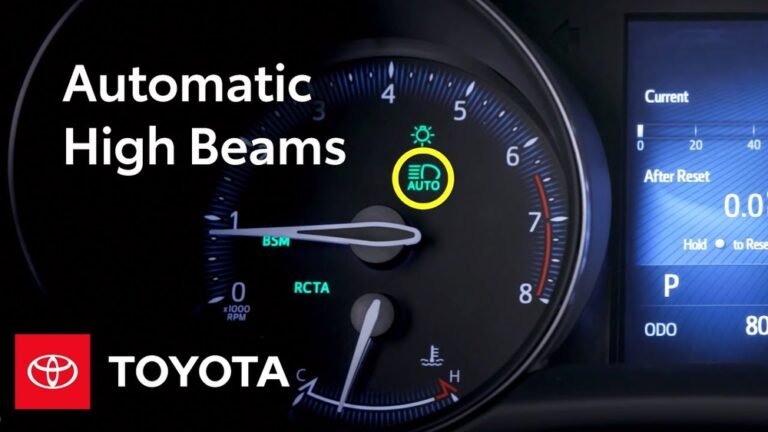
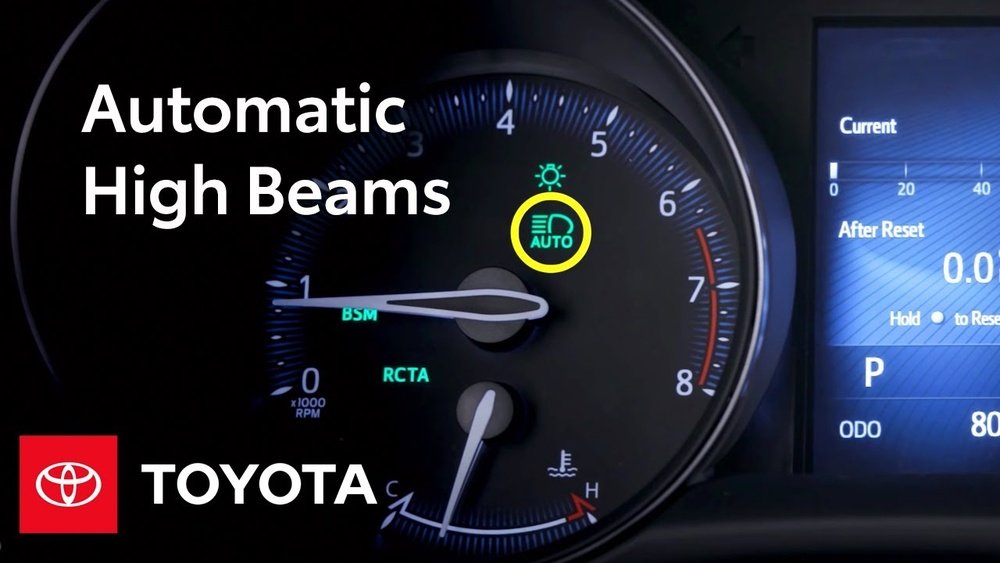
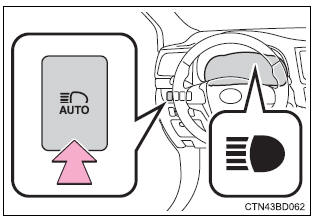
- Locate the automatic high beam button: It often looks like a headlight with the letter “A” and is usually on the dashboard to the left of the steering wheel.
- Press the button: A green or blue icon may appear or disappear from your dashboard, confirming the change.
- Check the Multi-Information Display (MID): On some trims, you need to use the steering wheel’s arrow buttons to enter the settings menu:
- Press the “Menu” or “Settings” button on the steering wheel.
- Scroll to “Vehicle Settings” or “Lights.”
- Look for “Automatic High Beams” and toggle it off.
Pro tip: If the green “A” icon with headlights disappears from your dashboard, the system is off.
Digital Control Table
| Action | Result | Indicator on Dashboard |
|---|---|---|
| Press auto high beam button | Turns system on/off | “A” icon appears/disappears |
| Toggle via MID | Enables/disables feature | Menu confirmation |
2015–2017 Toyota Camry
In these models, the process is more manual. The high beam lever (light stalk) controls the feature.
Step-by-step Instructions
- Turn on the car: The engine should be running or in accessory mode.
- Check the headlight switch: Rotate the end of the light stalk to “Auto” or “Headlights On.”
- Push the stalk away from you: This usually turns on high beams. If automatic high beams are active, an “A” icon appears.
- To turn off automatic high beams: Pull the stalk back toward you briefly. The “A” icon should go away, and you’ll control high beams manually.
Insider tip: If you only want regular high beams, push the stalk forward without activating auto mode.
2012–2014 Toyota Camry
Most Camrys from these years do not have automatic high beams. If you have a higher trim or a special package, check your manual. Otherwise, you use the light stalk to control high beams manually.
Step-by-step Instructions
- Start the car.
- Rotate the light stalk to the headlight position.
- Push or pull the stalk for high beams.
Note: No need to turn off automatic high beams—they are not included.

Credit: www.youtube.com
Common Mistakes When Turning Off Automatic High Beams
Even experienced drivers make mistakes with this feature. Here are the most common errors and how to avoid them:
- Confusing dashboard icons: The “A” in the headlight icon means automatic high beams are on. If it’s not there, you are using manual mode.
- Not starting the car: Some settings cannot be changed unless the car is in the “On” or “Accessory” position.
- Forgetting to check the menu: On digital models, turning off the physical button may not disable the feature in the menu.
- Missing hidden buttons: Some models hide the auto high beam button low on the dashboard or next to the trunk release.
- Assuming all Camrys have this feature: Many older models or lower trims do not include automatic high beams.
What To Do If You Can’t Turn Off Automatic High Beams
If you follow the steps and the system stays on, try these troubleshooting steps:
- Check for obstructions: Clean the windshield near the rearview mirror. Even a small sticker or dirt can block the camera.
- Restart the car: Sometimes electronics need a fresh start. Turn off the car, wait a minute, and try again.
- Consult the owner’s manual: Toyota has detailed instructions for each model.
- Visit a Toyota service center: If the system still won’t turn off, the dealer can check for software or wiring problems.
Some users report that a weak battery or recent jump-start can confuse the car’s computer. In these cases, a Toyota technician can reset the system.

Credit: www.reddit.com
Frequently Asked Questions
How Do I Know If My Toyota Camry Has Automatic High Beams?
Look for a headlight icon with an “A” on your dashboard when your headlights are on. If you see this, your car is equipped with automatic high beams. You can also check your owner’s manual or ask your Toyota dealer.
Will Turning Off Automatic High Beams Affect My Other Safety Features?
No. Turning off automatic high beams only affects the beam-switching function. Other systems like lane departure warning or adaptive cruise control will still work normally.
Can I Turn Off Automatic High Beams While Driving?
Yes, you can. For most models, simply press the auto high beam button or adjust the light stalk. The change takes effect immediately and is safe to do while driving, as long as you can do it safely.
Why Won’t My Automatic High Beams Turn Off?
This could be due to a few reasons: the camera is blocked, the button is not working, or there’s a software issue. Try cleaning the windshield, restarting the car, or using the menu controls. If it still doesn’t work, visit a Toyota service center or check the official Toyota Owners Resources for help.
Can I Disable Automatic High Beams Permanently?
Most Toyota Camrys let you turn off automatic high beams, but the setting may reset when you restart the car. Some users ask dealers to disable the feature via software, but this depends on the model and local laws. Ask your Toyota dealer for details.
Final Thoughts
Automatic high beams are a helpful feature, but they’re not perfect for every situation. Whether you’re driving in fog, want more control, or simply find the system distracting, turning off automatic high beams in your Toyota Camry is easy when you know how.
Remember, the method depends on your car’s year and trim, so always check your manual and dashboard icons. Avoid common mistakes, and if you ever get stuck, don’t hesitate to reach out to a Toyota expert. With a little practice, you’ll be able to control your Camry’s headlights with confidence and drive safely at night, your way.