How to Turn off Smart Cruise Control Hyundai Palisade Quickly

Many people love driving the Hyundai Palisade because it’s comfortable and packed with modern features. One of the most popular features is Smart Cruise Control (SCC). This system helps you keep a safe distance from the car in front, making highway driving easier. But sometimes, you may want to turn it off—maybe you prefer to control the speed yourself, or you’re driving in busy city traffic where SCC feels too sensitive.
If you are new to the Hyundai Palisade or just starting with advanced car technology, turning off Smart Cruise Control might seem confusing. You’re not alone; many owners feel the same way. This article will guide you through every step, explain why and when to turn off SCC, and help you avoid common mistakes.
You’ll also learn about related features, safety tips, and get answers to questions other drivers often ask.
Understanding Smart Cruise Control In The Hyundai Palisade
Before you turn off SCC, it’s important to know how it works. Smart Cruise Control is an advanced version of regular cruise control. Instead of just keeping your car at a set speed, it uses radar and cameras to watch the traffic ahead. If a car slows down in front of you, SCC automatically reduces your speed to keep a safe gap. When traffic clears, it brings your Palisade back to your chosen speed.
A few key points to remember:
- SCC is different from manual cruise control. If you’re used to older cars, you might expect cruise control to just keep the speed. SCC is smarter, but it can surprise you if you don’t expect it to slow down or speed up automatically.
- SCC is part of the Hyundai SmartSense system. This means it may connect to other features like lane keeping and automatic emergency braking.
Reasons To Turn Off Smart Cruise Control
There are situations where SCC might not be ideal. Here’s why you might want to turn it off:
- City driving: In busy stop-and-go traffic, SCC can become annoying, as it tries to brake and accelerate often.
- Bad weather: Heavy rain, snow, or fog can reduce the radar’s accuracy, so manual control is safer.
- Road work or unusual roads: SCC may not detect lane changes or road edges well, especially in construction zones.
- Personal preference: Some drivers simply feel more comfortable controlling speed without automation.
How To Turn Off Smart Cruise Control In The Hyundai Palisade
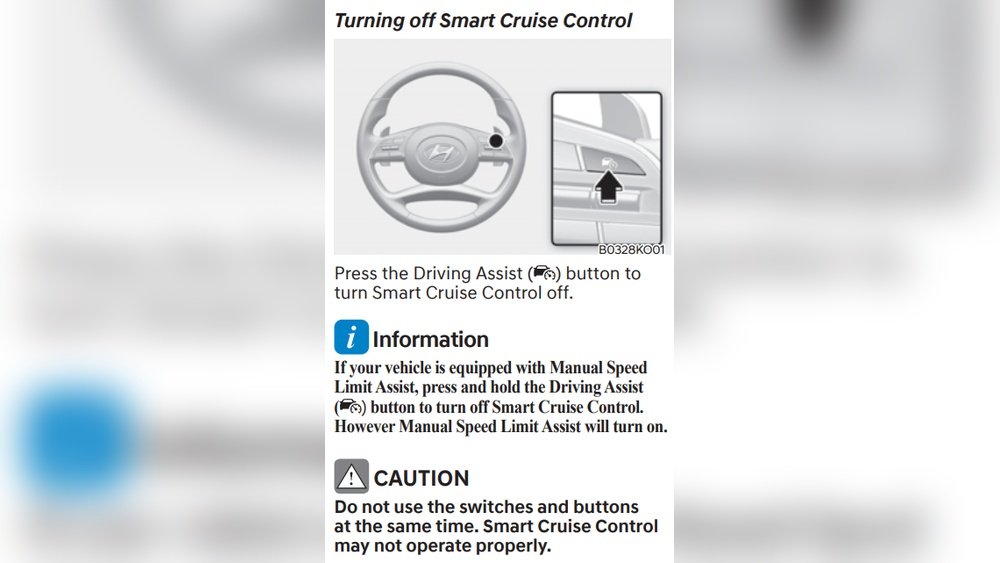
Turning off SCC is simple once you know where to look. Here’s a step-by-step guide:
1. Locate The Cruise Control Buttons
The SCC controls are on the right side of your steering wheel. Look for a cluster of buttons usually marked with a speedometer icon or the word “CRUISE”.
2. Deactivate While Driving
If SCC is active (you see a green or white cruise icon on your dashboard), you can turn it off by:
- Pressing the “CRUISE” button: This cancels all cruise functions, including SCC.
- Pressing the brake pedal: This will temporarily turn off SCC. However, the system remembers your last setting, so pressing “RES+” will start it again.
- Pressing the “CANCEL” button: This pauses SCC but doesn’t fully turn off the cruise system. To completely deactivate, use the “CRUISE” button.
3. Turn Off Smart Cruise Control Fully
To make sure SCC is off, always press the “CRUISE” button until the dashboard icon disappears. If you only use the “CANCEL” button or the brake, SCC stays on standby.
4. When Starting Your Next Drive
SCC does not stay on after the car is turned off. You have to reactivate it each time you want to use it. If you don’t press the “CRUISE” button, SCC stays off.
Quick Comparison: Methods To Turn Off Scc
| Method | Effect | Recommended For |
|---|---|---|
| Press “CRUISE” Button | Fully turns off SCC | When you want full manual control |
| Press Brake Pedal | Pauses SCC temporarily | Short breaks, traffic situations |
| Press “CANCEL” Button | SCC on standby | Quick pause, not full shutdown |
What Happens After You Turn Off Smart Cruise Control
When SCC is off:
- Your Hyundai Palisade will not maintain a set speed.
- You control the speed and distance from other cars yourself.
- Other safety features, like collision warning, may still work.
If you turn off SCC by mistake, you can reactivate it easily by pressing the “CRUISE” button again and setting your desired speed.
Common Mistakes When Turning Off Smart Cruise Control
Many new owners make simple errors. Here are some things to watch for:
- Thinking SCC is off when it’s on standby: Always check your dashboard. If the cruise icon is still there, SCC is not completely off.
- Forgetting to check for traffic before manual driving: Once SCC is off, you must judge distances yourself.
- Pressing “CANCEL” instead of “CRUISE”: Remember, “CANCEL” is just a pause. Use “CRUISE” to turn off SCC fully.
Practical Tips For Using And Disabling Smart Cruise Control
- Get used to the button layout: Practice finding and pressing the right buttons while parked.
- Check dashboard alerts: The Palisade tells you when SCC is on or off. Learn the icons.
- Don’t turn off SCC in dangerous situations: If you’re unsure, keep it on until you can stop safely.
- Adjust settings before driving: If you don’t want SCC, turn it off before you start your trip.
- Consider your driving environment: City streets, heavy rain, or winding mountain roads may be better with SCC off.

Credit: www.youtube.com
Differences Between Smart Cruise Control And Regular Cruise Control
Some drivers confuse SCC with regular cruise control. Here’s a simple comparison:
| Feature | Smart Cruise Control | Regular Cruise Control |
|---|---|---|
| Keeps Set Speed | Yes | Yes |
| Adjusts for Traffic | Yes (automatic) | No (manual brake needed) |
| Uses Radar/Cameras | Yes | No |
| Can Be Turned Off | Yes | Yes |
| Part of Driver Assist Package | Yes | No |
When Should You Keep Smart Cruise Control On?
While there are times to turn off SCC, it’s also helpful in many situations:
- Long highway trips: Reduces fatigue by controlling speed and distance.
- Night driving: Helps you stay alert, especially on empty roads.
- Consistent traffic: When traffic is light and moving steadily, SCC is very helpful.
But remember, SCC is not self-driving. You still need to pay attention at all times.
How To Make The Most Of Smart Cruise Control
If you decide to use SCC, here are ways to get the best from it:
- Set your following distance: You can usually adjust how close you want to stay behind other cars. Find the button with a car icon and lines behind it.
- Stay aware: Even with SCC, always keep your hands on the wheel and watch the road.
- Understand limits: SCC can’t handle every situation, like sudden traffic jams or sharp curves.
- Update your knowledge: The Palisade’s owner’s manual or Hyundai’s official website often has updates and tips.
Real-world Example: Turning Off Scc In A Parking Garage
Imagine you’re driving into a busy parking garage. SCC may try to speed up or slow down in ways that don’t fit the tight, slow-moving space. Here’s what you can do:
- As you enter the garage, press the “CRUISE” button to turn off SCC.
- Keep your foot ready for the brake, and drive at a safe, slow speed.
- Once you leave the garage and return to open roads, you can choose to turn SCC back on.
Credit: www.santacruzforums.com
Safety Precautions When Disabling Smart Cruise Control
Turning off SCC means you’re in full control. Here are extra safety steps:
- Stay focused: No automation is helping you with speed or distance.
- Be ready for sudden stops: Without SCC, you must react quickly to cars ahead.
- Check your speed often: Especially if you’re used to SCC handling it for you.
What To Do If Scc Won’t Turn Off
In rare cases, the system may not respond. Here’s what you can try:
- Double-check the button: Press the “CRUISE” button firmly.
- Stop the vehicle: Shift to “Park” and restart the car.
- Check for warning messages: Your dashboard might show an error.
- Consult your owner’s manual: Look for “Smart Cruise Control” troubleshooting.
If nothing works, contact your Hyundai dealer for help. Sometimes, a software update or sensor cleaning is needed.
How Smart Cruise Control Affects Other Features
SCC is just one part of the Palisade’s driver assistance systems. Turning it off does not turn off features like lane keep assist, blind-spot monitoring, or forward collision warning. These features are controlled separately.
However, if you have turned off SCC because of sensor issues (like mud or snow on the radar), other features that use the same sensors may also be affected.
Comparison: Scc Button Functions
For a quick look at what each button does on your steering wheel, see below.
| Button | Icon | Main Function |
|---|---|---|
| CRUISE | Speedometer | On/Off for all cruise controls |
| CANCEL | Pause symbol | Temporarily stop cruise control |
| SET/- | Down arrow | Set or decrease speed |
| RES/+ | Up arrow | Resume or increase speed |
| Distance Set | Car with lines | Adjust following distance |
Two Insights Beginners Usually Miss
- SCC only works above a certain speed: If you try to activate it under 20 mph (or in some cases, 5 mph), it won’t turn on. This is why you can’t use SCC in heavy stop-and-go traffic, and why it may seem to “turn off” by itself at low speeds.
- Sensor cleanliness matters: SCC uses a radar behind the front grille and a camera near the windshield. If these are dirty, SCC may not work properly, or might turn off unexpectedly. Wipe these areas gently if you notice SCC acting strange.
Frequently Asked Questions
What Is The Fastest Way To Turn Off Smart Cruise Control In The Hyundai Palisade?
The fastest way is to press the “CRUISE” button on the steering wheel. This shuts off SCC and the regular cruise control completely. Always check that the cruise icon disappears from your dashboard.
Does Turning Off Scc Affect Other Safety Features?
No, turning off SCC only stops the automatic speed and distance control. Features like lane keep assist or blind-spot monitoring stay on unless you turn them off separately.
Can I Turn Off Scc While Driving At High Speed?
Yes, you can turn off SCC at any speed by pressing the “CRUISE” button. However, be prepared to control your speed and distance from other cars immediately.
Why Does Scc Sometimes Turn Off By Itself?
SCC can turn off if you drive below the minimum speed, the system detects a problem with sensors, or there are bad weather conditions. Always check for warning lights and clean your sensors if needed.
Where Can I Find More Information About Smart Cruise Control?
You can read the latest details and safety updates in your owner’s manual or visit the official Hyundai Palisade page.
Hyundai’s Smart Cruise Control is a fantastic feature, but knowing how and when to turn it off gives you more confidence and safety behind the wheel. With these simple steps and tips, you’ll feel in control, whether you want automated help or prefer to drive fully on your own.

Credit: www.youtube.com