How to Turn off Smart Cruise Control Hyundai Santa Fe Easily

If you drive a Hyundai Santa Fe, chances are you’ve enjoyed the comfort and safety of Smart Cruise Control (SCC). This feature can make long drives less tiring and help you keep a safe distance from other cars. But sometimes, you may want to turn it off—maybe in heavy traffic, on winding roads, or simply because you want full control. For many new owners, though, figuring out how to switch off Smart Cruise Control isn’t always obvious. This guide will walk you through everything you need to know, step by step, using simple language and real examples.
What Is Smart Cruise Control In Hyundai Santa Fe?
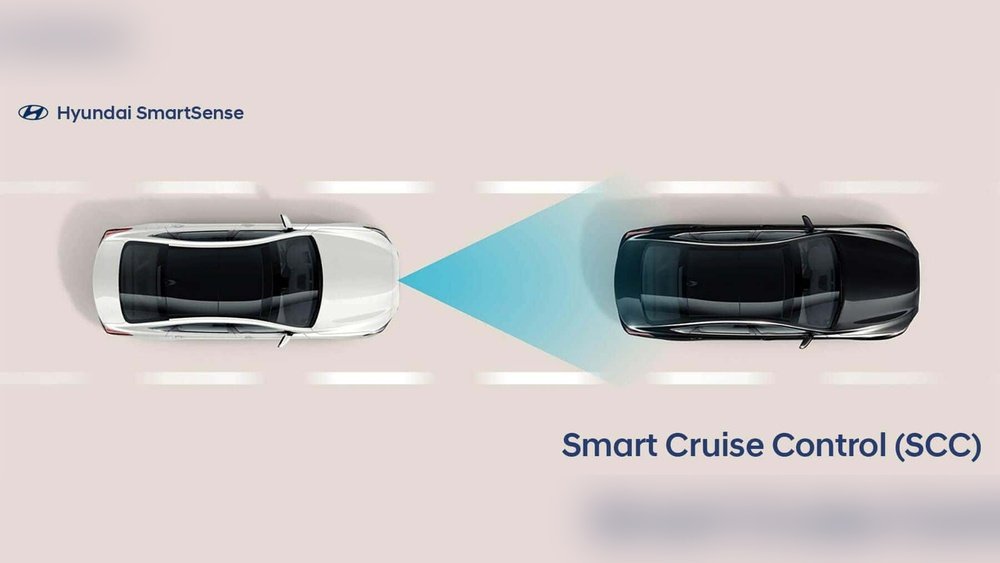
Smart Cruise Control is more than regular cruise control. It not only keeps your car at a set speed but also automatically slows down or speeds up to keep a safe distance from the vehicle in front. This is thanks to sensors and radar at the front of your Santa Fe.
Let’s say you set your cruise speed to 65 mph on the highway. If a slower car moves in front of you, SCC will slow down your Santa Fe. When the lane clears, your car returns to your chosen speed.
This system makes driving less stressful, but sometimes, you may want to turn it off for more direct control or in certain road conditions.
Reasons To Turn Off Smart Cruise Control
There are several situations where you might want to deactivate this feature:
- City driving: In stop-and-go traffic, SCC can become annoying as it keeps adjusting speed.
- Bad weather: Heavy rain, snow, or fog can make sensors less reliable.
- Curvy roads: On winding roads, you may need to control speed and distance more closely.
- Personal preference: Some drivers simply prefer traditional driving.
Understanding when to use and when to turn off SCC helps you stay safe and comfortable on the road.
How Smart Cruise Control Works
Before you turn off SCC, it helps to know how it operates. In the Hyundai Santa Fe, SCC uses:
- Front radar: Detects vehicles ahead.
- Camera: Helps recognize lane markings.
- Car’s computer: Processes information and controls speed, throttle, and brakes.
When you activate SCC, the car takes over some driving tasks. But you’re still responsible for steering and being alert.
Step-by-step: How To Turn Off Smart Cruise Control
Turning off SCC in your Hyundai Santa Fe is simple, but the process can feel confusing if you’re new to the system. Here’s how to do it safely:
1. Find The Cruise Control Buttons
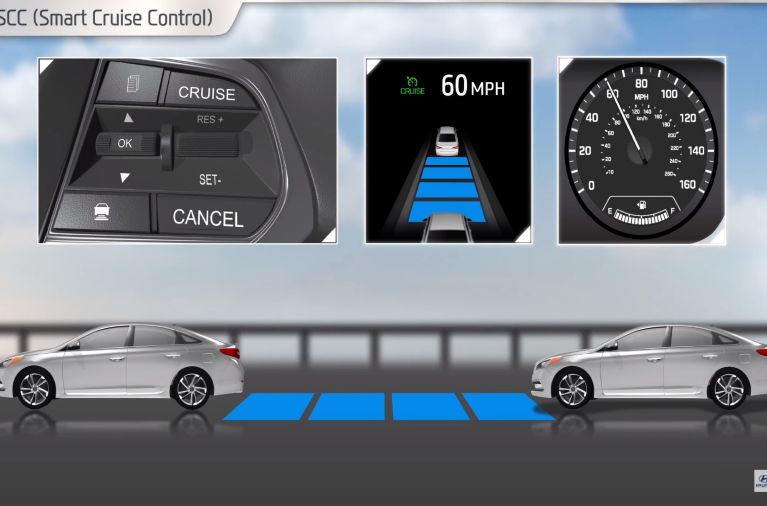
On your Santa Fe’s steering wheel, you’ll see a group of buttons. Look for the cruise control symbol—usually a small speedometer icon.
- ON/OFF button: Turns cruise control on or off.
- SET/- and RES/+ buttons: Set your speed or resume.
- CANCEL button: Temporarily pauses cruise control.
Some newer models also have a dedicated Smart Cruise Control button.
2. Turning Off Smart Cruise Control Completely
To fully deactivate SCC:
- Press the Cruise Control ON/OFF button: This is the most direct way. When you press it, you’ll see the cruise control indicator light turn off on your dashboard. This shuts down all cruise functions, including Smart Cruise Control.
- Press the Brake Pedal: Tapping the brake pedal will cancel cruise control but does not turn it off entirely. The system stays on standby.
- Press the CANCEL button: This will also pause SCC, but like the brake, the system stays ready.
Important: Only the ON/OFF button will fully turn off SCC. If you only use CANCEL or the brake, SCC can be reactivated with a single button press.
3. Switching From Smart To Regular Cruise Control
Some Hyundai Santa Fe models let you switch between Smart Cruise Control and Conventional Cruise Control. Hold the cruise control button for more than 2 seconds. You’ll see a message on the display showing which mode is active. In “conventional” mode, the car does not adjust for the vehicle ahead.
4. Watch The Dashboard Indicators
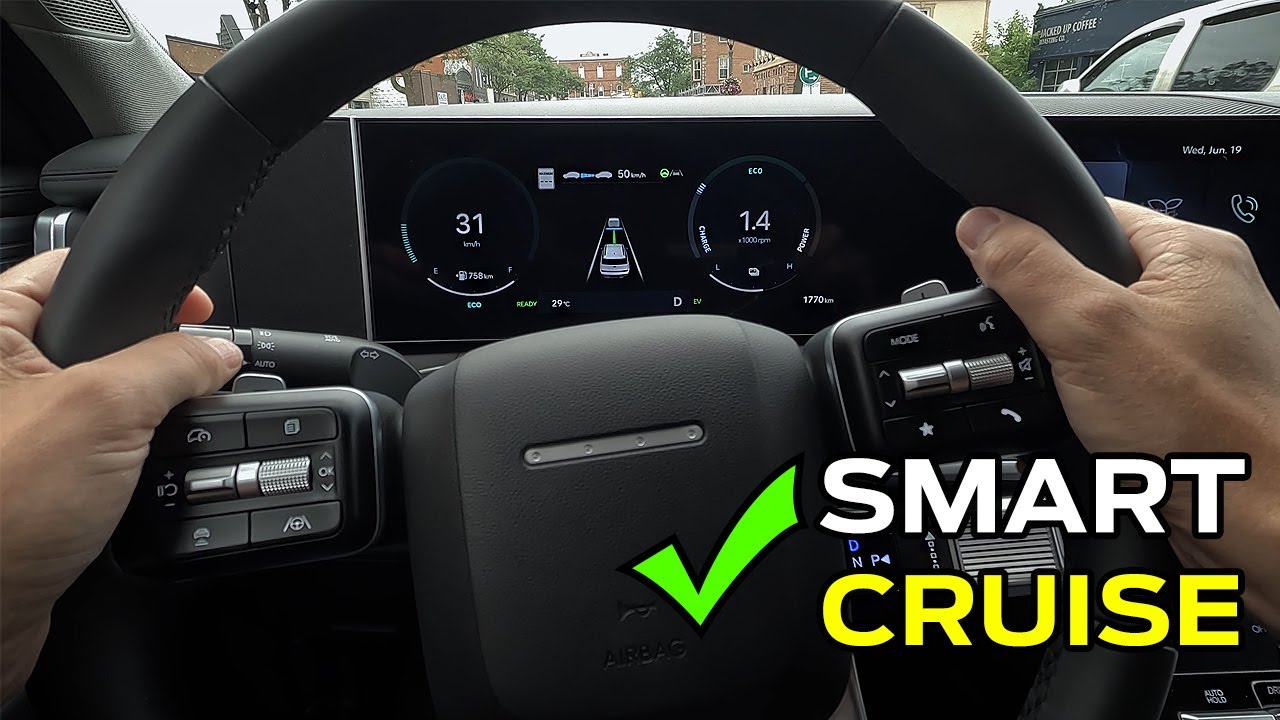
Your instrument cluster will show which cruise mode is active. When SCC is off, the indicator disappears or changes. Always confirm by looking at the dashboard so you know the system is truly off.
5. Double-check In Unfamiliar Cars
If you’re using a rental or borrowed Hyundai Santa Fe, controls may be slightly different depending on the model year or trim. Take a moment to check the owner’s manual or ask the owner about the buttons before driving.
Credit: www.hyundai.news
Hyundai Santa Fe: Cruise Control Button Comparison
To make it easier, here’s a quick comparison of the main buttons you’ll find on your steering wheel:
| Button Name | Symbol | Main Function |
|---|---|---|
| ON/OFF | Speedometer Icon | Activate/deactivate all cruise control |
| CANCEL | X or “CANCEL” | Pause cruise without turning off |
| SET/- | Arrow Down | Set or lower speed |
| RES/+ | Arrow Up | Resume or increase speed |
| Distance Setting | Car with lines ahead | Adjust following distance in SCC mode |
If you’re unsure, check your car’s manual for the exact button layout.
Common Mistakes When Turning Off Smart Cruise Control
Many new Hyundai Santa Fe drivers make simple errors when trying to turn off SCC. Here are two frequent mistakes:
1. Only Pressing The Brake Or Cancel
Pressing the brake or CANCEL button does not fully turn off the system. SCC remains on standby, ready to resume. If you want it completely off, you need to press the ON/OFF button.
2. Forgetting Dashboard Confirmation
Some drivers assume SCC is off just because they pressed a button. Always check the dashboard indicator to make sure. If you see the cruise icon, the system is still active in some way.
What To Do If Smart Cruise Control Won’t Turn Off
Sometimes, you may press the right button, but SCC doesn’t deactivate. Here’s what to check:
- Sticky buttons: Dirt can cause buttons to stick. Clean them gently with a soft cloth.
- Software glitches: Rarely, the car’s computer may freeze. Turn your Santa Fe off and restart.
- Sensor issues: If a sensor is blocked or malfunctioning, SCC may not behave normally. Clean the radar area at the front of your car.
If problems continue, contact your Hyundai dealer for a system check.
Safety Tips When Using Or Disabling Smart Cruise Control
- Stay alert: Even with SCC, always keep your hands on the wheel and eyes on the road.
- Don’t rely on SCC in bad weather: Rain, snow, or fog can confuse sensors.
- Know your controls: Practice turning SCC on and off in a safe area.
- Watch for system messages: Your Santa Fe will warn you if sensors are blocked or if the system needs attention.
Credit: www.youtube.com
Real-world Example: Turning Off Scc In A 2023 Hyundai Santa Fe
Imagine you’re driving your 2023 Hyundai Santa Fe on the highway. You’re using Smart Cruise Control, but traffic gets heavy, and you want to take over. Here’s what you would do:
- Glance at the steering wheel and locate the cruise control ON/OFF button.
- Press the ON/OFF button. The green cruise control light on your dashboard disappears.
- Gently tap the brake pedal as an extra safety check—your car is now under full manual control.
- Watch for any alerts or messages on the dashboard to confirm SCC is fully off.
Hyundai Santa Fe Model Differences
Hyundai has updated the Santa Fe over the years, so cruise control features can differ. Here’s a quick look at how newer and older models compare:
| Model Year | Cruise Control Type | Smart Cruise Control Button? |
|---|---|---|
| 2017 and older | Standard Cruise Control | No |
| 2018–2020 | Smart Cruise Control (optional) | Yes (on some trims) |
| 2021–2024 | Smart Cruise Control (standard on most) | Yes |
If you drive an older Santa Fe, you may only have standard cruise control. Always check your trim and owner’s manual.
When To Leave Smart Cruise Control On
While this article focuses on turning off SCC, it’s worth knowing when you should keep it on:
- Long highway trips: SCC can reduce fatigue and help you maintain a safe distance.
- Light traffic: It works best when traffic flows smoothly.
- Speed-limited zones: SCC helps you stick to the speed limit.
Using SCC at the right time can make your drives safer and more comfortable.
Smart Cruise Control Vs. Other Hyundai Safety Features
Hyundai Santa Fe models often come with other safety systems. Here’s how SCC compares to similar features:
| Feature | Main Function | Can It Be Turned Off? |
|---|---|---|
| Smart Cruise Control | Keeps set speed and distance | Yes (via ON/OFF button) |
| Lane Keeping Assist | Helps keep car in lane | Yes (separate button) |
| Blind-Spot Collision-Avoidance | Alerts to cars in blind spot | Yes (separate button) |
Each feature has its own control, so learn which button does what before you drive.
Two Surprising Facts Most Beginners Miss
- SCC can be paused but not fully off: Many assume tapping the brakes or CANCEL turns the system off. In reality, only the ON/OFF button fully disables Smart Cruise Control.
- Switching modes is possible: Some Santa Fe models let you switch to regular cruise control by holding the cruise button. This gives you more control in different driving situations.
More Resources For Hyundai Santa Fe Owners
If you want to dig deeper into Hyundai’s driver assistance features, check out the official Hyundai USA site:
hyundai Usa – Santa Fe

Credit: www.youtube.com
Frequently Asked Questions
How Do I Know If Smart Cruise Control Is Active?
Look for the cruise control icon or a car-with-distance symbol on your dashboard. If you see it, SCC is active. If the icon disappears, the system is off.
Does Pressing The Brake Turn Off Smart Cruise Control Completely?
No. Pressing the brake only pauses or cancels SCC. The system stays on standby and can be resumed. To turn off SCC completely, press the cruise control ON/OFF button.
Can Smart Cruise Control Be Disabled Permanently?
No, SCC cannot be permanently turned off through normal car settings. You must turn it off each time you want to drive without it. For permanent changes, you’d need a dealer to adjust advanced settings.
Is Smart Cruise Control Safe To Use In The Rain?
It’s best not to use SCC in heavy rain, snow, or fog. Bad weather can block the sensors and cause the system to react unexpectedly. Always drive manually in poor weather.
What Should I Do If The Smart Cruise Control System Malfunctions?
If SCC doesn’t respond or shows error messages, stop the car safely, turn off the engine, and restart. If issues continue, contact your Hyundai dealer for a system inspection.
Turning off Smart Cruise Control in your Hyundai Santa Fe is simple once you know the steps. Always use the right button, check your dashboard, and choose the driving mode that suits the road ahead. With a bit of practice, you’ll drive with more confidence—whether you prefer technology or traditional control.